
Automated Employee Onboarding System: A Google Workspace Case Study
An HR consulting firm automated their employee onboarding process using Google Apps Script to eliminate manual tasks and reduce setup time.
Difficulty
Advanced
Time Required
20-25 hours
Technologies
6 Tools
Manual onboarding processes took 3 hours per hire, including folder creation, template copying, email sending, and permission assignment, resulting in 156 hours lost annually and inconsistent experiences.
Implemented a Google Apps Script automation that creates folder structures, generates documents, sends welcome emails, and assigns permissions automatically when a new hire is added to a spreadsheet.
Reduced onboarding time from 3 hours to 12 minutes per employee while ensuring consistent processes and correct permissions.
Automated Employee Onboarding System: A Google Workspace Case Study
How One HR Firm Cut Onboarding Time from 3 Days to 12 Minutes
Sarah runs an HR consulting firm with 40 employees. Every new hire means 3 hours of manual work: creating folders, copying templates, sending welcome emails, assigning permissions. That's 156 hours a year lost to copy-paste. Apps Script eliminates that work. Add a name to a spreadsheet, and the system creates folders, generates documents, sends emails, and tracks progress automatically. No clicks. No browser tabs. No forgetting the training materials link.
The Challenge
Manual Drive Folder Creation Takes 45 Minutes Per Hire
HR creates a folder structure (Documents, Training, IT Setup), copies templates, and manually shares with the new hire, their manager, and IT. Wrong permissions get set. Folders land in the wrong department structure. One hire took 2 days to get access because the folder was shared with john.smith@gmail.com instead of john.smith@company.com.
Welcome Packets Depend on Who's Working That Day
The onboarding checklist lives in Susan's head. When she's out, new hires get a two-line email with no instructions. The company handbook link goes missing. First-day expectations? Whoever remembers to send them. Compliance training gets forgotten until the audit finds the gap.
Email Sequences Are Ad-Hoc or Never Happen
Day 1 welcome email gets sent. Day 3 check-in? Only if someone sets a calendar reminder. Week 1 survey? Forgotten. Time-to-productivity stretches to 25 days because no one follows up on training completion. The onboarding spreadsheet shows "Status: In Progress" for hires who started 6 months ago.
No Real-Time Visibility Into Onboarding Progress
HR doesn't know if IT created the accounts. IT doesn't know if HR sent the handbook. Managers ask "Did they get the training link?" and the answer is always "Let me check." Follow-ups are reactive. Bottlenecks appear when someone quits mid-onboarding and no one knows what's been done.
Quota Limits and Authorization Nightmares
Manual API testing hits the daily limit at 11 AM. Scripts fail silently. Permission errors pop up randomly. Every new hire needs IT to re-authorize something. The script that worked last week breaks because someone revoked a scope.
The Solution
The Trigger-Based Workflow
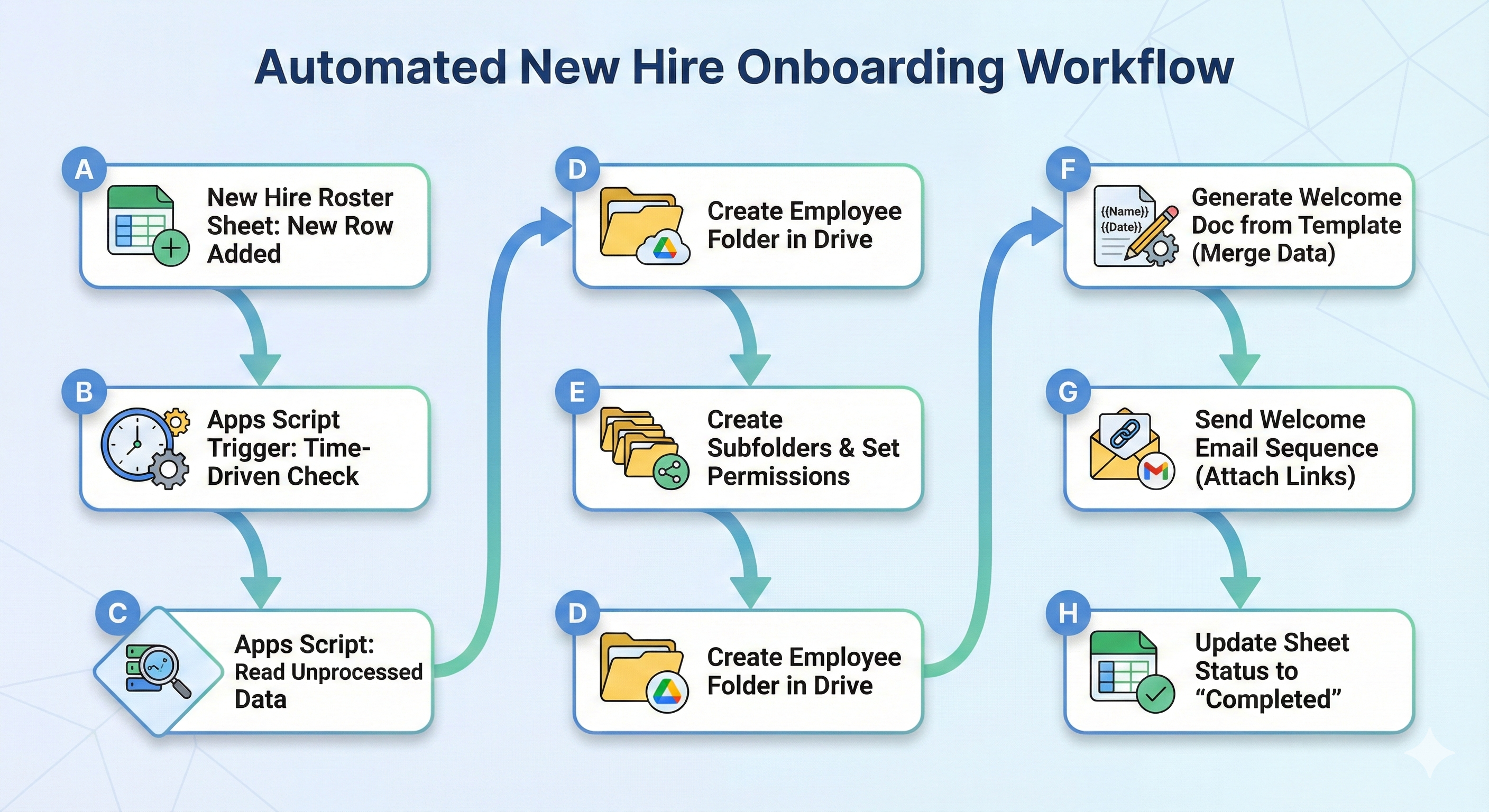
Add a row to the hiring spreadsheet. Apps Script detects it using an onChange() trigger and launches a four-step sequence:
-
Create the folder structure — Parent folder → Department subfolder → New hire folder with Documents, Training, and IT Setup subfolders. Assign editor access to the hire, their manager, and HR.
-
Generate the welcome packet — Pull the employee name, department, and start date into a Google Doc template. Add department-specific checklists. Store the doc in their folder.
-
Send the email sequence — Day 1 welcome email with folder link and first-day instructions. Schedule follow-ups for Day 3 (training check-in) and Week 1 (feedback survey).
-
Update the tracking sheet — Log the folder URL, document URL, email status, and timestamp. Status changes from "Pending" to "Complete."
The Stack
- Google Sheets — Hiring database and progress tracker
- Apps Script — Automation engine running the workflow
- DriveApp — Folder creation and permission management via
createFolder()andsetSharing()methods - DocumentApp — Template-based document generation
- GmailApp — Email delivery and sequencing
- Time-based triggers — Schedule follow-up emails without manual intervention
The workflow takes 12 minutes from spreadsheet entry to completion.
Implementation Guide
Prerequisites
You Need:
- Google Workspace Business Standard or higher (Apps Script requires workspace domain)
- Admin access to grant Drive, Docs, and Gmail API scopes
- Editor access to the hiring spreadsheet
- A parent folder in Drive for storing all onboarding folders (get the folder ID from the URL)
You Should Know:
- How to open Apps Script editor (Extensions → Apps Script in Sheets)
- Basic JavaScript syntax (variables, functions, loops)
- How to read spreadsheet data using
getValues() - What OAuth scopes are and how to authorize them
Architecture
Resources
Official Documentation:
- Google Apps Script Overview — Core platform documentation
- Class Trigger | Apps Script — Installable trigger reference and event objects
- Class SpreadsheetTriggerBuilder — Spreadsheet-specific trigger configuration
- Enum Permission | Apps Script — Drive permission levels and sharing methods
- Google Drive API Reference — Complete Drive API documentation
- Google Docs API Reference — Document creation and manipulation
- Gmail API Reference — Email sending and management
- Admin SDK Directory API — User provisioning and workspace management
Specific Guides:
- Google Workspace Updates - August 9, 2024 — Latest Apps Script trigger improvements
- Codelab: Provisioning Google Workspace — Step-by-step user account provisioning
Troubleshooting:
- Apps Script Quota Limits — Daily limits and rate limiting strategies
- Apps Script Authorization Guide — OAuth scopes and permission management
Need this customised for your team? Book a 30-minute call. We'll review your onboarding workflow, identify integration points, and scope the work. Just click on the button below and send us line.
Need a Custom Automation Solution?
We specialize in building tailored Google Workspace automations for businesses of all sizes. Let us help you eliminate repetitive tasks and streamline your workflows.