
Automate Billing: Dynamic PDF Invoice Generation in Google Workspace
This automation solution transforms structured data in Google Sheets into professional, branded PDF invoices, automating the entire billing lifecycle.
Difficulty
Intermediate
Time Required
15-20 hours
Technologies
6 Tools
The consulting agency faced significant time consumption and risk due to repetitive, manual labor involved in generating and distributing monthly invoices.
A zero-touch invoice automation system was implemented using Google Workspace to dynamically generate, file, track, and securely email PDF invoices.
The agency recovered 12.5 hours of administrative time monthly, allowing the solution to pay for its development cost within the first billing cycle.
Automate Billing: Dynamic PDF Invoice Generation in Google Workspace
1. The Solution: Zero-Touch Invoice Automation
2. ROI Snapshot & System Overview
This automation solution transforms structured data within a Google Sheet into professional, branded PDF invoices. It automates the entire billing lifecycle, including document creation, organized filing in Google Drive (by month/year), status tracking, and secure distribution via email.
ROI Snapshot: For an agency handling 50 invoices per month (15 minutes per invoice manually), this solution recovers 12.5 hours of administrative time monthly. The script pays for its development cost within the first billing cycle.
3. The Bottleneck: Why Manual Billing Fails
Consulting agencies often face bottlenecks in their monthly billing cycles. The typical process involves repetitive, manual labor that introduces risk and delays cash flow:
- Time Consumption: Operations staff waste hours manually copying finalized time and expense data from a tracking sheet into a separate, stylized invoice template.
- High Error Proneness: Every manual data transfer—client address, service hours, unit rates, or final totals—risks transposition errors, leading to billing disputes and re-issuing costs.
- Lack of Standardization: Invoices lack consistent branding, file naming conventions, or a centralized filing structure, making end-of-quarter auditing and historical retrieval a nightmare.
- Inefficient Status Tracking: The operational record (the Google Sheet) often lags behind the actual financial status. Invoice generation and delivery status require manual updates, creating discrepancies.
4. The Serverless Stack: Google Workspace Architecture
We deployed a serverless automation stack built entirely within Google Workspace. This solution requires zero external software licenses and runs entirely on Google’s infrastructure.
- Data Source (Google Sheet): Acts as the single source of truth for all billing data. A dedicated 'Status' column controls the script's action (e.g.,
Pending,Generated,Sent). - Template (Google Document): A branded Google Doc serves as the master template, utilizing specific text placeholders (e.g.,
{{INVOICE_ID}}) for mail-merge. - Engine (Google Apps Script - GAS): The custom JavaScript engine handling data reading, template copying, mail-merge, PDF conversion, and cleanup.
- Storage (Google Drive): Organizes final PDF invoices automatically. The script creates dynamic folders based on the current year and month (e.g.,
Invoices/2024/07 - July) ensuring immediate audit readiness.
5. Implementation: Code and Setup
5.1 Prerequisites
- Google Workspace Account: Required for full functionality (Script permissions for Drive and Gmail).
- Google Sheet (Data Source): Must contain columns mapping exactly to the placeholders in your template.
- Google Document (Invoice Template): Placeholders must be unique (e.g.,
{{INVOICE_ID}}). Avoid applying rich text formatting directly to the placeholder text. - Google Drive Folder Structure: A designated root folder for the generated invoices.
5.2 Workflow Diagram
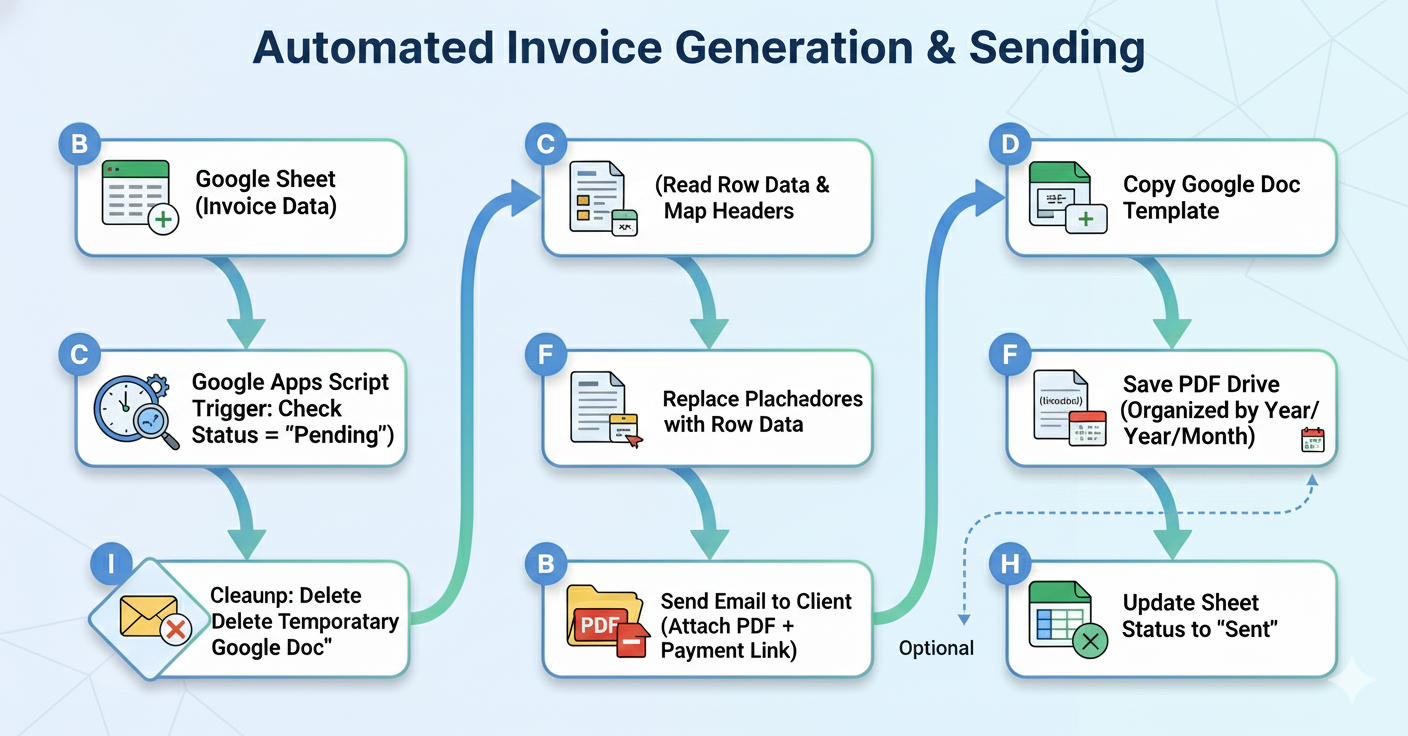
5.3 Step-by-Step Code Implementation
Access the Script Editor from your Google Sheet (Extensions -> Apps Script).
Step 1: Define Constants and Utility Functions
// Pseudo code for the application
CONSTANTS: SHEET_NAME, TEMPLATE_ID, FOLDER_ID

FUNCTION getBillingSheet
  RETURN Sheet 'Billing Register'
END FUNCTION
Step 2: Core Execution Loop and Data Mapping
The main function iterates through the sheet, identifying rows flagged for processing (Pending).
// Pseudo code for the application
FUNCTION generateInvoices
  GET Sheet and Data
  MAP Headers to Column Indices

  FOR EACH Row IN Data:
    IF Status IS 'Pending':
      TRY
        // 1. Generate PDF
        FILE = CALL createAndSaveInvoice(Row)

        // 2. Email Client
        CALL sendInvoiceEmail(Row, FILE)

        // 3. Update Status
        SET Status = 'Sent'

      CATCH Error
        SET Status = "Error: {Message}"
END FUNCTION
Step 3: Creating and Organizing the PDF
This function handles the heavy lifting: mail-merge, folder organization, PDF conversion, and temporary document deletion.
// Pseudo code for the application
FUNCTION createAndSaveInvoice(row)
  EXTRACT Invoice Data [ID, Client, Amount, Date]

  // Template Processing
  COPY Template Doc -> TEMP_Doc
  REPLACE Placeholders in TEMP_Doc
  SAVE and CLOSE

  // Organization
  GET Target Folder (Year/Month struct)

  // PDF Creation
  CONVERT TEMP_Doc to PDF
  SAVE PDF in Target Folder

  TRASH TEMP_Doc
  RETURN PDF_File
END FUNCTION
Step 4: Email Distribution
// Pseudo code for the application
FUNCTION sendInvoiceEmail(row, pdfFile)
  GET Client Email
  IF No Email THEN RETURN

  SEND Email to Client
    SUBJECT: "Invoice {ID} - Payment Due"
    BODY: "Please find attached invoice..."
    ATTACHMENT: pdfFile
END FUNCTION
5.4 Testing Checklist
| Test Case | Expected Result |
|---|---|
| Data Integrity | All sheet data is correctly merged into the temporary Google Doc. |
| PDF Generation | A correctly formatted, non-editable PDF is created. |
| Drive Organization | The PDF is saved in the correct [Root Folder]/[Year]/[Month - Name] directory structure. |
| Status Update | The row in the Google Sheet is updated from "Pending" to "Sent." |
| Cleanup | The temporary Google Doc copy used for merging is successfully deleted (trashed). |
5.5 Troubleshooting
| Issue | Potential Cause | Resolution |
|---|---|---|
Execution failed: Document is missing |
Incorrect TEMPLATE_DOC_ID or permission issues. |
Verify the ID. Ensure the template document is shared with the script owner as an Editor. |
| Placeholder text remains in the PDF | Misspelling in the placeholder or hidden formatting (spaces/line breaks). | Use the "Show non-printing characters" option in Google Docs to check for hidden formatting within the placeholder brackets. Use exact text matches in replaceText. |
| Script times out (6-minute limit) | Processing too many complex invoices in a single execution. | Implement batch processing. Modify the loop to process only the first 20 pending rows, then set up a time-driven trigger to run the script every 5 minutes. (Maximum execution time is 6 minutes.) |
| Email fails to send | GmailApp permissions not authorized, or the Client Email cell is empty. |
Run the script manually once to force the authorization dialog. Add data validation to the Client Email column. |
6. Advanced Enhancements
Maximize ROI by addressing complex billing structures and cash flow management with these additions:
- Dynamic Line Item Tables: Read service details from a separate sheet (filtered by
Invoice ID) and dynamically duplicate rows within the Google Doc body to populate detailed service breakdowns. - Automated Payment Reminder Engine: Deploy a separate weekly trigger. It checks rows where
Statusis 'Sent' andPaid Dateis empty. If the invoice is > 30 days old, the script triggers an escalating reminder email. - Dedicated Error Logging Sheet: Replace basic
Logger.logcalls with a function that appends detailed error metadata (timestamp, row number, error message) to a dedicated sheet named_Script_Error_Log.
// Pseudo code for the application
FUNCTION logError(rowNumber, invoiceId, errorMsg)
  GET OR CREATE Sheet '_Script_Error_Log'
  APPEND [Timestamp, InvoiceID, Row, Error]
END FUNCTION
7. Resources
- Google Apps Script Documentation (Document Service Reference): Official Google Documentation for DocumentApp Class
- Google Drive Service Reference: Official Google Documentation for DriveApp Class
- Working with Gmail and Attachments: Official Google Documentation for GmailApp Class
- Best Practices for Time-Driven Triggers: Avoiding Execution Limits and Triggers Guide
Need This Deployed?
Stop selling hours and start saving them. If your agency is drowning in manual billing, don't waste time debugging boilerplate code.
I build and deploy The Invoice Generator, a pre-vetted, robust automation product customized to your exact Google Doc template and payment gateway. We handle the full deployment, testing, and documentation, guaranteeing a functional, error-logged billing system deployed within 48 hours.
Book a 30-minute call. We'll review your onboarding workflow, identify integration points, and scope the work. Just click on the button below and fill the form to help us get started.
Related Industry Guides
Agency Time Tracking Automation | Mereth
Automate time tracking with Google Workspace. Capture hours, generate invoices, and analyze profitability by client and project.
Need a Custom Automation Solution?
We specialize in building tailored Google Workspace automations for businesses of all sizes. Let us help you eliminate repetitive tasks and streamline your workflows.