
Automating Sales Pipeline Intelligence: Real-Time Deal Tracking and Revenue Forecasting with Google Sheets
An automation that pulls deal data from CRM APIs, calculates metrics, flags at-risk deals, and emails formatted pipeline reports every Friday without manual work.
Difficulty
Intermediate
Time Required
8-12 hours
Technologies
4 Tools
Sales ops spends 156 hours annually copying CRM data into spreadsheets, creating 3-5 day visibility lags and missing at-risk deals stuck in negotiation.
Google Apps Script syncs data from CRM APIs directly to Google Sheets, automatically calculates pipeline metrics, identifies stalled deals, and distributes reports via email.
Eliminates 3 hours of weekly manual work, provides real-time deal visibility, enables early warning system for at-risk deals, and improves forecast accuracy.
Automating Sales Pipeline Intelligence: Real-Time Deal Tracking and Revenue Forecasting with Google Sheets
Your sales ops manager spends 3 hours every Friday copying data from Salesforce into a spreadsheet to build a pipeline report. The data's already stale by Monday morning. This automation pulls deal data from your CRM APIs, calculates metrics, flags at-risk deals, and emails a formatted report every Friday at 8 AM—no manual work required.
Why Manual Pipeline Management Fails
156 hours per year on copy-paste: Sales ops copies deal data from Salesforce and HubSpot into Google Sheets each week.
3-5 day lag in visibility: Leadership reviews pipeline data that's already outdated. Deals stall for weeks before anyone notices.
No early warning system: Deals stuck in "Negotiation" for 30+ days go undetected until they're cold.
Inconsistent forecasting: Revenue projections calculated manually in Excel with different formulas per rep. Last quarter's Q4 forecast missed by 23%.
Friday afternoon fire drills: Sales ops scrambles to compile the weekly summary while reps ask where their deals are.
How It Works
Google Apps Script syncs data from CRM APIs directly into Google Sheets using the Sheets API and UrlFetch service. The script runs daily at 6 AM, pulling updated deal records and calculating key metrics. Conditional formatting rules highlight stalled deals automatically. A trigger emails the formatted report to leadership every Friday morning.
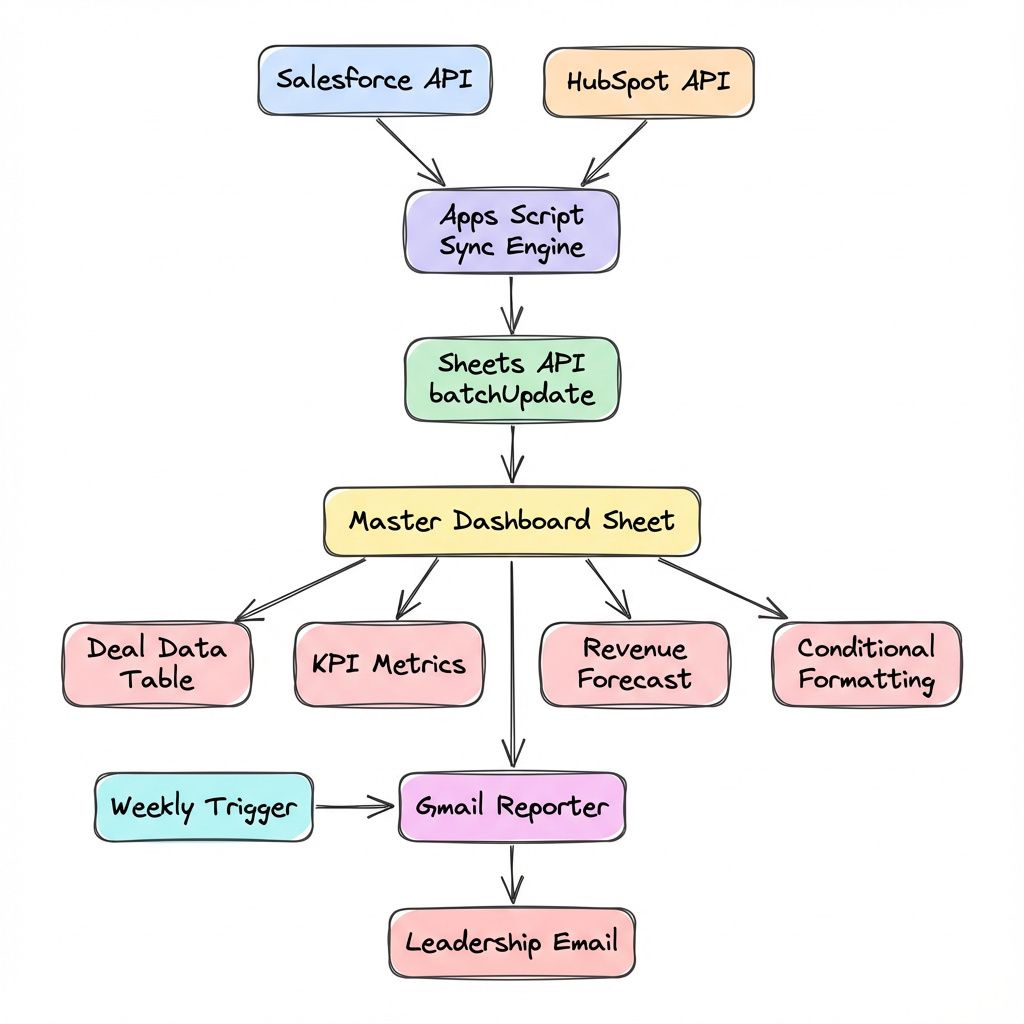
Implementation
Prerequisites
OAuth Scopes:
https://www.googleapis.com/auth/spreadsheetshttps://www.googleapis.com/auth/gmail.sendhttps://www.googleapis.com/auth/script.external_request
Permissions: Editor access to target spreadsheet. Enable Google Sheets API and Gmail API in Google Cloud Console.
Config: Store CRM API keys in Script Properties (File > Project properties > Script properties). Never hardcode credentials.
Core Automation Script
// Pseudo code for the application
FUNCTION syncPipelineData
  GET Sheets [Pipeline Data, Metrics]
  GET API Key

  TRY
    FETCH Deals from Salesforce (Last 90 Days)
    IF API Error THEN THROW Error

    PARSE API Response

    TRANSFORM into Rows:
      CALCULATE DaysInStage
      FLAG if Stalled (>30 days in Neg/Prop)
      EXTRACT Details [ID, Name, Amount, Stage, Prob, CloseDate, Owner]

    CLEAR Data Sheet
    WRITE Headers
    WRITE Rows (Batch)

    CALL applyConditionalFormatting
    CALL updateMetrics

    LOG Success

  CATCH Error
    SEND Failure Email to Admin
    THROW Error
END FUNCTION
// Pseudo code for the application
FUNCTION applyConditionalFormatting(spreadsheetId, sheetId)
DEFINE Formatting Rule:
IF 'Stalled' column is 'YES'
THEN Set Background Red
EXECUTE BatchUpdate for Formatting Rule
END FUNCTION// Pseudo code for the application
FUNCTION updateMetrics(sheet, rows)
CALCULATE:
Total Deals
Total Value
Average Deal Size
Stalled Count
Weighted Forecast
CLEAR Metrics Sheet
WRITE Metric Name & Value Pairs
END FUNCTION// Pseudo code for the application
FUNCTION sendWeeklyReport
GET Metrics Sheet Data
BUILD HTML Report
Table of Key Metrics
Link to Dashboard
SEND Email to Leadership
SUBJECT: "Weekly Pipeline Report"
BODY: HTML Body
END FUNCTIONDeploy in 7 Steps
1. Create sheets
Add "Pipeline Data" (columns: Deal ID, Company, Amount, Stage, Probability, Close Date, Days in Stage, Owner, Stalled) and "Metrics" (columns: Metric, Value).
2. Enable Advanced Sheets Service
In Apps Script editor: Services (+) > Google Sheets API > Add.
3. Add API credentials
Go to Project Settings > Script Properties > Add property. Name: SALESFORCE_API_KEY, Value: your Salesforce API token (from Setup > Security Controls).
4. Paste the script
Copy the code above into the Apps Script editor (Extensions > Apps Script). Replace your-instance.salesforce.com with your Salesforce domain.
5. Create triggers
Click Triggers (clock icon) > Add Trigger:
- Function:
syncPipelineData, Event: Time-driven, Day timer, 6 AM - Function:
sendWeeklyReport, Event: Time-driven, Week timer, Friday 8-9 AM
6. Test the sync
Click syncPipelineData and hit Run. Authorize when prompted. Check Execution Log for "Synced X deals successfully".
7. Monitor quota
Apps Script allows 20,000 daily URL fetches. View quota usage in Executions tab.
Troubleshooting
Script times out after 6 minutes
Apps Script has a 6-minute execution limit. The query filters to LAST_N_DAYS:90 to stay under this. For historical data, split into multiple queries and cache results in Script Properties.
Conditional formatting not applying
Verify the Advanced Sheets Service is enabled (Step 2). Check that sheetId is the numeric ID from the URL (gid=123456789), not the sheet name.
"Service invoked too many times" error
You're hitting daily quota limits. Batch API calls—fetch all deals in one request instead of individual queries per owner. Use UrlFetchApp.fetchAll() for parallel requests when syncing multiple sources.
Ready to Deploy?
This code is production-ready for single CRM syncs. Multi-source integrations (HubSpot, Pipedrive, email engagement) typically need 4-6 hours of customization to map fields consistently.
Need this for your team? Book a 30-minute call to walk through your current process. I'll deploy this in your workspace with your specific CRM stack configured, tested, and documented—typically 2-3 days. 30-day code warranty included: if something breaks in the first month, I fix it free.
Need a Custom Automation Solution?
We specialize in building tailored Google Workspace automations for businesses of all sizes. Let us help you eliminate repetitive tasks and streamline your workflows.