
Generate PDF Invoices from Google Sheets Automatically
Automate invoice PDF generation and delivery with Apps Script. Save 6+ hours weekly, eliminate formatting errors, and create an audit trail—no more manual copy-paste.
Your accountant exports 40 invoices every Monday. Click. Download as PDF. Rename. Upload to Drive. Draft email. Repeat 40 times. That's 6 hours a week on copy-paste theater. One misclick and Invoice_2024_Final_FINAL_v3.pdf gets sent to the wrong client. Here's the Apps Script that fixes it.
Manual Invoice PDFs Break Predictably
- Time hemorrhage: 6-8 hours weekly for teams processing 100+ invoices. That's 312 hours a year—nearly 8 work weeks.
- Formatting roulette: Google Sheets' native "Download as PDF" crops columns unpredictably. Your branded header? Gone. Invoice totals? Cut off.
- No audit trail: Which version did you send? Who approved it? Your Drive folder has 17 files named "Invoice_March_Client_X."
- Email bottleneck: PDFs saved, but you still manually attach, draft, and send. The automation stops halfway.
Most teams tolerate this until an invoice goes to the wrong client or a $50K typo slips through.
The Fix: Apps Script + Drive API
Apps Script reads your invoice data, exports a formatted sheet as PDF using the Drive API's files.export method, saves it to a named folder, and drafts a Gmail with the attachment ready. Total execution time: under 2 minutes per batch of 50 invoices (well within the 6-minute script execution limit).
// Pseudo code for the application
FUNCTION generateInvoicePDFs(sheetName, folderID)
  GET Sheet and Data (Batch Read)
  GET Drive Folder

  FOR EACH Row IN Data:
    EXTRACT [Email, Amount, InvoiceNum, Date]
    IF Empty Row THEN SKIP

    TRY
      // Export PDF via Drive API
      GET PDF Blob = exportSheetAsPDF(SpreadsheetID, SheetID, RowIndex)
      SAVE PDF to Drive Folder

      // Draft Email
      CREATE Gmail Draft
        TO: Email
        SUBJECT: "Invoice {InvoiceNum}"
        ATTACHMENT: PDF

    CATCH Error
      LOG "Failed on Row {Index}"
END FUNCTION

FUNCTION exportSheetAsPDF(ssID, sheetID, rowNum)
  CONSTRUCT Export URL (Format=PDF, Range=Row)
  FETCH URL with OAuth Token

  IF Response OK THEN
    RETURN Blob
  ELSE
    THROW Error
END FUNCTION
How It Works
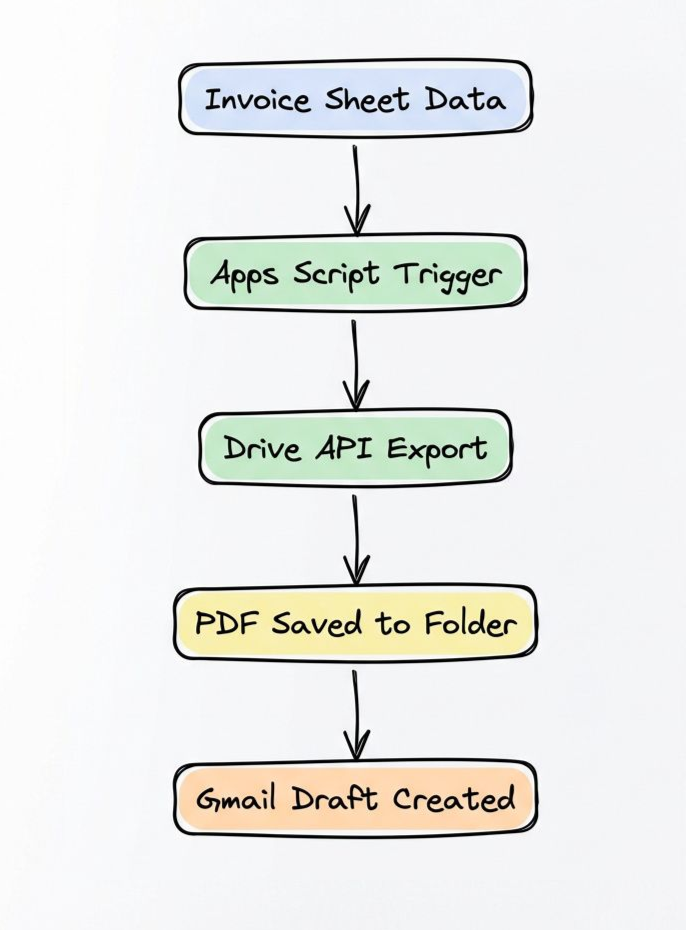
The script runs on schedule (daily, weekly, or manually). Each execution:
- Reads your invoice data in one batch call
- Exports each row as a PDF via Drive API
- Names files using invoice number and date
- Drafts emails with PDFs attached
Your inbox fills with ready-to-send drafts. Review, hit send, done.
Get It Running in 7 Steps
1. Set up your invoice template sheet
Create columns: Client Email, Amount, Invoice Number, Date. Add branding (logo, company info) in cells above row 1—these export in the PDF.
2. Open Apps Script editor
In your Sheet: Extensions > Apps Script. Paste the code above.
3. Enable Drive API access
In the Apps Script editor: Services (left sidebar) > Add "Drive API" > Select v3.
4. Get your Drive folder ID
Create a folder for invoices. Open it. The URL ends with /folders/[LONG_STRING]—that's your folder ID. Replace folderID in the script.
5. Test on one row
Run generateInvoicePDFs('Sheet1', 'YOUR_FOLDER_ID') manually. Check your Drive folder and Gmail drafts. Verify formatting.
6. Add a weekly trigger
In Apps Script: Triggers (clock icon) > Add Trigger > Select function generateInvoicePDFs > Time-driven > Weekly on Monday 9am.
7. Monitor quota usage
Apps Script allows 20,000 UrlFetch calls daily. Each invoice = 1 call. Batch sizes over 500/day need quota management.
Build It Yourself or Get Help
Build this yourself (Apps Script):
- Cost: $0
- Time: 2-3 hours to adapt the code
- Limit: 20,000 invoices/day, 6-minute execution per batch
- Best for: <200 invoices/month, need pixel-perfect PDFs
Book a call, running by Friday. 30-day warranty.
I'll adapt this script to your sheet, set up the trigger, and guarantee it works for 30 days. If it breaks, I fix it free.
Three things to remember:
-
Drive API exports PDFs natively—no DocuSign, no Zapier tax. Watch your 20K daily URL fetch quota if you're processing hundreds daily.
-
One trigger handles 50 invoices in under 2 minutes—test your batch size before going live. Script execution maxes at 6 minutes total.
-
Branded PDFs saved + Gmail drafts ready—eliminates 6 hours of weekly clicking and kills the "wrong attachment" panic.
Your accountant gets Monday mornings back. Your clients get professional invoices. You get an audit trail in Drive. Build it this weekend, or call me Friday and it's running Monday.
Related Industry Guides
Need a Custom Automation Solution?
We specialize in building tailored Google Workspace automations for businesses of all sizes. Let us help you eliminate repetitive tasks and streamline your workflows.