
Skip the Add-on: Build a Google Forms Approval Workflow in 30 Minutes
Build an automated Google Forms approval workflow in 30 minutes using Apps Script—route requests to managers and eliminate manual email back-and-forth.
Skip the Add-on: Build a Google Forms Approval Workflow in 30 Minutes
Your manager just forwarded you a time-off request buried in a 47-email thread from three weeks ago. By the time she approves it, the employee's already on vacation. Google Forms dumps submissions into a spreadsheet and calls it done—no routing, no notifications, no approval logic.
Here's the fix: 30 minutes of Apps Script gives you automated manager sign-off without installing a single add-on.
Forms Create Paperwork, Not Workflows
Your current process:
- Employee fills out Google Form
- You manually check the responses sheet (or worse, rely on email alerts)
- You email the manager to approve/reject
- Manager replies in a separate thread
- You update the spreadsheet by hand
- You email the employee the decision
Real cost: 15-20 minutes per approval. At 8 requests per week, that's 2.5 hours wasted on administrative ping-pong.
The Form Workflow Plus add-on (72K+ installs) proves demand exists—but you don't need it. Apps Script's onFormSubmit trigger handles approval routing natively. You own the code. Zero monthly fees.
Apps Script Watches Your Form
When someone submits a Google Form, Apps Script fires a trigger. Your script grabs the submission, logs it to Sheets, and emails the manager with approve/reject links. Manager clicks a link, the script updates the sheet, employee gets notified. Done.
The stack: Google Form → Apps Script onFormSubmit trigger → Google Sheets (audit trail) → GmailApp (notifications).
// Pseudo code for the application
FUNCTION onFormSubmit(submissionEvent)
  GET Sheet 'Responses'
  EXTRACT [Timestamp, Employee, Type, StartDate, EndDate, Reason] from event

  GET Manager Email
  CONSTRUCT Approve/Reject Links (calling Web App URL)

  SEND Email to Manager
    SUBJECT: "Approval Needed: {Employee} - {Type}"
    BODY: "Dates: {Start} to {End}\nReason: {Reason}\n[APPROVE LINK] | [REJECT LINK]"

  UPDATE Sheet Status to 'Pending'
END FUNCTION
// Pseudo code for the application
FUNCTION doGet(request)
GET Action (approve/reject) and Row Number from URL Parameters
VALIDATE Action and Row
GET Current Status from Sheet
IF Already Processed THEN RETURN "Already {Status}"
UPDATE Sheet Status to 'Approved' or 'Rejected'
SEND Notification to Employee
SUBJECT: "Request {Status}"
RETURN HTML "Request has been {Status}"
END FUNCTIONOAuth scope: https://www.googleapis.com/auth/gmail.send (Apps Script prompts on first run)
Quota: Consumer accounts get 100 emails/day, Workspace accounts get 1,500/day. At 8 approvals/week (16 emails), you're using 1% of consumer quota or 0.1% of Workspace quota.
The Flow
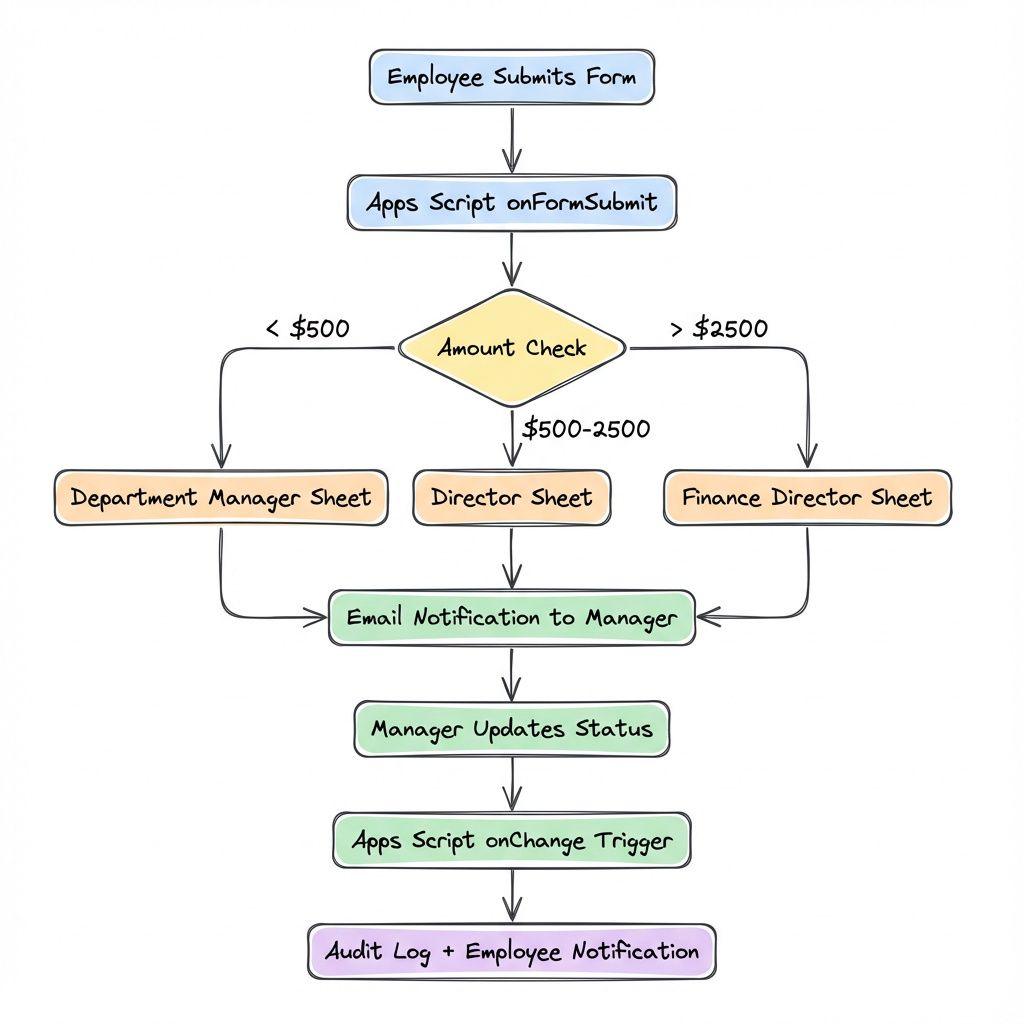
Deploy in 8 Steps
- Create your Google Form with fields: Employee Name, Request Type (dropdown), Start Date, End Date, Reason
- Link to a Google Sheet: Form responses → "View responses in Sheets"
- Add Status column: Insert column G, header "Status"
- Open Apps Script: Extensions → Apps Script in the spreadsheet
- Paste the code above: All three functions
- Set manager email: File → Project properties → Script properties → Add: Property:
MANAGER_EMAIL, Value:manager@company.com - Deploy as web app: Deploy → New deployment → Type: Web app → Execute as: Me → Access: Anyone in your organization → Deploy
- Create trigger: Triggers (clock icon) → Add Trigger → Function:
onFormSubmit→ Event source: From spreadsheet → Event type: On form submit → Save
Test it: submit your form. Manager gets email within 30 seconds. Click approve. Sheet updates. Employee gets confirmation.
Multi-department routing: If different managers approve different request types, add Script Properties for each (MANAGER_EMAIL_HR, MANAGER_EMAIL_FINANCE) and use an if statement after line 15 to route based on request type.
Build vs Buy: 30-Day Math
| DIY | Form Workflow Plus | |
|---|---|---|
| Setup | 30 minutes | 5 minutes |
| Cost | $0 forever | ~$8/user/month |
| Customization | Unlimited | Limited |
| Risk | None | Vendor shutdown, price hikes |
Break-even: After 1 month, you've saved $96 annually. After 3 years, that's $288 per workflow.
Build it yourself if you have 30 minutes and need custom routing (department-specific approvals, multi-level sign-off, compliance audit trails).
Buy the add-on if you need it live in 5 minutes and your manager won't wait for OAuth scopes.
Three Things You Stop Doing Monday
- Stop manually forwarding form submissions — the
onFormSubmittrigger routes the second the form is submitted - Stop losing approval requests in email — your Sheets tab is now a permanent audit trail with timestamps
- Stop paying monthly fees for basic workflows — this code costs nothing and runs inside your existing Google Workspace
Ready to build? Use the code above and follow the 8 steps. If it doesn't work after setup, book a call—I'll have it running in your workspace by Friday. 30-day warranty included.
Related Industry Guides
Need a Custom Automation Solution?
We specialize in building tailored Google Workspace automations for businesses of all sizes. Let us help you eliminate repetitive tasks and streamline your workflows.